Features
Admin Portal
Most of the features provided for in the SaaS Foundation template are found in the Admin Portal. That is becauase these are the generic features that are required for most applications. Things like- inviting users to the platform
- creating organizations
- managing organization members and inviting them to the platform
- managing user roles within the platform
- impersonating users, so you can see what a user would see
- banning users
Customer Portal
The Customer Portal comes with a smaller, but still useful set of features, based around managing organization members, such as- inviting and removing users to the organization
- managing user roles within the organization
Roles
Portal access is determined by roles the users have assigned to them. Admin Portal Access This is defined by theuser.role field. If this user is set null, the user has no access to the Admin Portal.
The valid for this field are admin and user. If it is set to any one of these, the user will have access to the
Admin Portal. The value determines their level of access within the Admin Portal.
Customer Portal Access
This is defined by the member.role field. Each member record is associated with a single organization, and the role
value on that record determines their level of access within that Organization within the customer portal. This means
a user can have different roles within different organizations. Valid values for this field
are owner, admin, and user.
Navigation
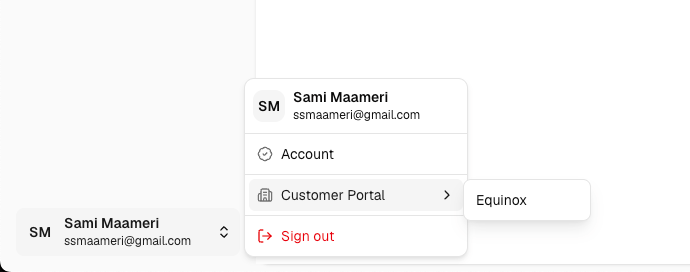
Use the user navigation menu in the lower-left corner to move between portals. From the Admin Portal, open the user navigation menu and select Customer Portal. This displays a list of organizations that you are a member of. Choose an organization from the submenu to open the Customer Portal as that organization.